


NCAA Women's CWS
3.734.00 Reviews
App Specs
- Version
- 172.24.0
- Updated On
- License
- Free
- Downloads
- 10,000+
- Developer
- Snap! Mobile
- Categories
- Sports
- Platform
- Android
Screenshots
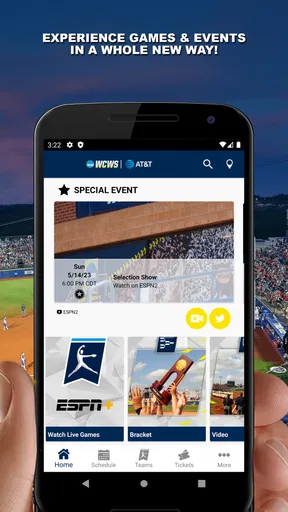
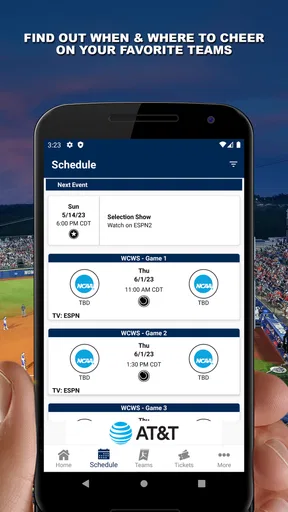
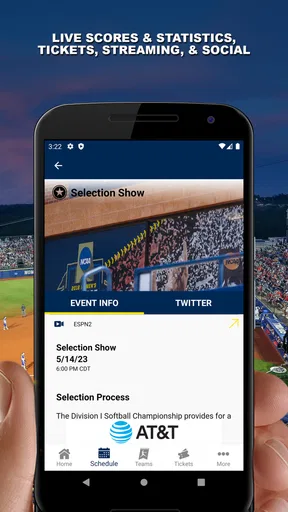
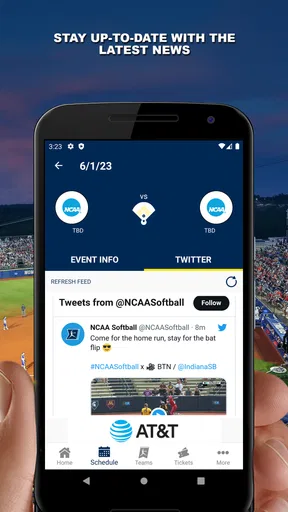
 Analysis by AppCompare
The first time I open NCAA Women's CWS, I want one simple thing: to find out what is happening in the Women’s College World Series without hunting through unrelated sports coverage. That is the clearest reason to try this free sports app from Snap! Mobile. It is aimed at fans following this particular championship, whether you know every team already or are just trying to keep up with a game while the rest of the day carries on.
What to expect from a championship-focused app
This is a narrower choice than a general sports-score app. That focus can be useful: when I am following the tournament, I would rather start with coverage centered on the event than sort through leagues and sports I do not need. The trade-off is just as important. If I mainly want broad coverage of professional sports or college competitions throughout the year, a general sports app is likely to suit me better.
The app is specifically for the NCAA Women's CWS, and its store description identifies it as the official app for the Women’s College World Series. It sits in the sports category, has an Everyone age rating, and is free to install. That makes it easy to consider as a companion for a fan, a family member following a player, or someone who wants to learn the tournament as it unfolds. I would still treat any single-event app as a seasonal tool rather than my only sports app.
Its audience is also reflected in its modest reach: it has over ten thousand installs and a 3.7 average from around eighty-six ratings, with thirty-four written reviews. I take that as a reason to set practical expectations, not as a verdict on whether it will work for me. A focused tournament app can be valuable even if it is not built for every sports fan, and the best test is whether it helps me follow the event I care about.
Getting started without making it a project
After installing it, I would begin by opening the app and looking for the current tournament information before changing settings or exploring every section. That gives a first-time user a quick way to check whether the event coverage matches what they need. The app is on version 172.24.0 and requires Android 10 or later; on iOS, I would check the app’s compatibility details in the relevant store before installing.
I would also make a deliberate choice about notifications. Alerts are most helpful when I cannot watch closely, but they can become distracting if I follow every update during a busy day. My practical approach is to allow only the alerts I actually want, then use the app when I have a moment to check scores or catch up. If I prefer a quiet phone, I can leave notifications off and open the app on my own schedule.
A first useful check on game day
A simple first success is checking a game’s score when I cannot be in front of a screen. For example, I might be waiting for an appointment, glance at the app, and see whether the matchup is still close before deciding whether to follow along more closely. That is a small task, but it tells me whether the app works as a convenient tournament companion for my routine.
Worth Reading Before You Choose

Baby Panda World Brings Quick Play to Modern Phones, but Its Game Library Feels Busy

ESPN’s Live Game View Makes Following Close Games Easier

QuizzLand Review: A Good Fit for Short Trivia Breaks, Not Every Player

Basketball Stars: Multiplayer Is Fast, but Can It Recover When Matches Go Wrong?

WEBTOON Turns Phone Updates Into a Better Reading Routine

Link to Windows Runs on Shared Habits, Not Social Feeds
If I am watching the game elsewhere, the app can play a different role: I can use its coverage to keep track of the competition while the live broadcast remains my main source of action. That distinction matters. A score update is useful for staying informed, but it is not the same experience as watching the game. I would not install it expecting the app alone to replace a broadcast or a full live viewing option.
Where expectations need a little care
Sports apps can be confusing when a user expects every feature to behave like a complete viewing service. Here, I would separate following the tournament from watching it. Scores, updates, and tournament information help me stay oriented; watching the games is a separate need, so I would use the broadcast option available to me if seeing each play matters.
I would also avoid assuming that every social or venue feature will be equally useful in every situation. Fan interaction is appealing if I enjoy discussing a game, while venue information matters most when I am actually attending. If I am following remotely and just want the result, those extras may not affect my decision at all. The most sensible first visit is to identify the one or two tools I will use rather than treating every section as essential.
The Ultimate Softball Experience
First off, let me tell you that the NCAA Women's CWS app is like having the entire championship in your pocket. From live scores to player stats, this app covers all bases. The interface is sleek and super easy to navigate, so even if you're not the most tech-savvy, you’ll have no trouble finding your way around.
Game Day Goodies
Alright, so what’s the scoop on game day? The app provides real-time updates, so you’re never out of the loop. Whether you're at work, in a boring meeting, or just chilling at home, the live score feature keeps you connected to every pitch, swing, and home run. Plus, the push notifications are a lifesaver—I mean, who wants to miss a walk-off homer?
But wait, there's more! You can dive deep into player stats, team standings, and even check out historical matchups. It’s like having a sports almanac right at your fingertips. For those who love to crunch numbers and predict outcomes, this feature is pure gold.
All About the Fans
If you're anything like me, you love being part of the fan community. The app's social integration lets you connect with other fans, share your predictions, and even engage in lively debates about who’s going to take home the trophy. It's a great way to feel the camaraderie and excitement, even if you're watching from afar.
And for those lucky enough to attend the games in person, the app’s got your back with venue maps, parking info, and even concession stand locations. It’s like having a personal assistant on game day.
Highlights and Recaps
Missed the game? No worries! The highlight reels and recap videos are there to save the day. You can catch all the thrilling moments without any spoilers. It’s perfect for those days when life gets in the way of your softball obsession.
Who will get the most out of it?
I would recommend it most to someone who follows the championship closely, wants a compact place to check scores and tournament details, or is attending and wants event information handy. It can also help a newer fan make sense of a matchup: checking team standings and player statistics gives context to a result rather than leaving the score as a number with no story behind it.
There are useful ways to dip in without turning every game into a research project. Before a matchup, I might glance at the standings; afterward, I could look at the score and relevant player information to understand what shaped the result. Historical matchups can add another angle for fans who enjoy comparing teams, but I would treat past meetings as context, not a guarantee of what will happen next.
For an everyday routine, imagine I have a short break between errands while a game is underway. I can check the live score, decide whether I want a notification for an important moment, then return to what I was doing. If I have more time later, highlights and recaps offer a way to catch up. That combination is more practical than trying to follow every pitch throughout a busy day.
Choosing between scores, video, and broader coverage
Compared with a general sports app, this one makes more sense when the Women’s College World Series is the event I care about most. A broad alternative may be better for tracking several sports, teams, or leagues in one place. Conversely, if I only need a quick final score and already use a general app, adding a dedicated tournament app may not change much for me.
It is also worth separating highlights from a full game. Recaps are a convenient way to revisit key moments, especially when time is short, but they cannot provide the same continuous view as watching live. If my priority is seeing every inning, I should plan around a broadcast; if my priority is staying informed while away from a screen, scores and alerts are the more natural fit.
Attending in person changes the balance. Venue maps, parking details, and concession locations are more relevant when I am on site than when I am following from home. I would check those sections before leaving rather than waiting until I reach the venue, so I can use the information to plan the visit. For someone who is not going to the games, those tools are peripheral, not a reason by themselves to install.
Small habits that make following easier
One useful habit is to decide in advance whether I want updates or only a quiet manual check. If I am working or sharing space with other people, frequent alerts may be a nuisance; opening the app during a break gives me control over when I catch up. If I am waiting for a close game to finish, alerts can reduce the need to keep checking the screen. The right choice depends on how closely I want to follow, not on a setting everyone should enable.
Another practical approach is to use stats with a specific question in mind. Rather than browsing every number, I can look at player stats after a game or compare historical matchups when I want context. This keeps the information useful instead of overwhelming. For a new fan, standings can be the quickest starting point; for a long-time follower, individual performance details may be more interesting.
On a day at the venue, I would treat the app as a helper rather than a complete trip planner. Maps and parking information can reduce uncertainty, while concession locations can help me orient myself once there. I would still make ordinary travel and timing decisions separately, and I would not assume that venue details replace checking the arrangements for the event itself.
When I would choose something else
I would skip this app if I do not follow college softball or if I want one place for year-round coverage across many competitions. I would also look elsewhere if my main requirement is watching a live stream, since the features described here are better understood as following, checking, and catching up than as a substitute for a dedicated viewing service.
There is a fair limitation in its focused purpose: its usefulness depends on my interest in this particular championship. The fan conversation and event tools can make the experience richer, but they will matter less to someone who wants nothing beyond a final score. A general score app may be simpler for that person, especially if it is already part of their daily routine.
Why You Should Download It
So, why should you hit that download button? Well, if you're passionate about college softball, this app is a must-have. It’s more than just an app; it’s your gateway to the heart of the Women’s College World Series. From keeping you updated on the latest scores to connecting you with other fans, it delivers a complete experience.
Moreover, the user-friendly design ensures that everything you need is just a tap away. The developers really nailed it with this one, focusing on what fans genuinely crave during the championship season.
In a nutshell, the NCAA Women's CWS app is your best buddy for all things softball. So, what are you waiting for? Dive into the action, stay informed, and most importantly, enjoy every moment of the Women’s College World Series. Happy watching!
Pros
- User-friendly interface for navigation.
- Real-time updates on game scores.
- Comprehensive player statistics available.
- High-quality video highlights included.
- Customizable notifications for favorite teams.
Cons
- Limited offline access to content.
- Occasional ads can be disruptive.
- Requires stable internet connection.
- Some features locked behind paywall.
- Interface may lag on older devices.
FAQs for NCAA Women's CWS
What is the NCAA Women's CWS app?
The NCAA Women's CWS app is an official mobile application providing comprehensive coverage of the Women's College World Series. It includes live scores, game schedules, team standings, and exclusive content. The app is designed for fans who want to stay updated on tournament progress, player stats, and team news directly from their mobile devices.
Is the NCAA Women's CWS app free to download and use?
Yes, the NCAA Women's CWS app is free to download on both Android and iOS platforms. While the app itself is free, users should be aware that data charges may apply depending on their mobile carrier's internet plan. Additionally, some exclusive content may require in-app purchases or subscriptions.
What features does the NCAA Women's CWS app offer?
The app offers a variety of features including live game updates, video highlights, in-depth player and team statistics, and customizable alerts for your favorite teams. Users can also access interactive tournament brackets and receive notifications about breaking news and special events related to the Women's College World Series.
Can I watch live games through the NCAA Women's CWS app?
The app provides links to live streams and broadcasts of the games, but it does not directly stream the games itself. Users will be redirected to official broadcasting partners’ platforms where they can watch live games, often requiring a subscription or login with a TV provider for full access.
How frequently is the content updated in the NCAA Women's CWS app?
The content within the NCAA Women's CWS app is updated in real-time, especially during the tournament. Live scores, statistics, and news are refreshed as events unfold. Users can rely on the app to provide the latest updates, ensuring they don’t miss any important moments or information about their favorite teams.


